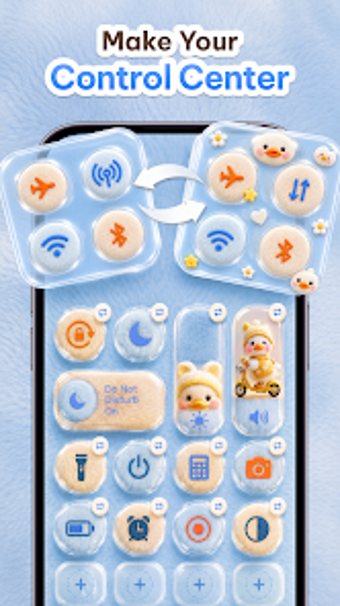
Accessibility-based custom control panel for Android
Control Theme: Custom Panel, by GoldenPlace, replaces the Android notification shade with a single configurable overlay that groups system toggles, media controls, and quick-access tools. The app exposes adjustable panel layouts, visual themes, and floating controls so users can tailor position, size, color, and transparency across the device. Included are screen capture and recorder shortcuts, personalized app slots, and multiple aesthetic themes. It suits Android users who want consolidated controls and visual personalization without switching between apps.
What does Control Theme change on the notification shade?
Control Theme acts as an overlay that substitutes the standard quick settings area with a unified control panel, combining connectivity toggles, media playback and in-app tools into one place. Key integrations include Wi-Fi and Bluetooth toggles, brightness and volume sliders, plus one-tap screenshot and screen recorder utilities. The panel can appear as a swipe-accessible hub or a floating control that is available from any screen.
How much customization does the panel allow?
The app exposes adjustable sizes and positions for the panel plus color and transparency controls so the interface can match a home screen or wallpaper. Users can pick from named aesthetic themes such as Neon, Minimalist, and Dreamy, and save layout changes. Personalized shortcut slots let people add and reorder favorite applications, giving control over which actions appear in primary positions.
Does the panel meaningfully affect battery life or performance?
GoldenPlace describes the design as lightweight and battery-friendly, and user feedback highlights responsive behavior while the overlay runs. Because the tool consolidates toggles, media controls, and capture utilities into a single process, it can reduce the need for several separate background apps. Performance impact depends on device hardware and which active elements, such as continuous screen recording, are enabled at the same time.
Is it easy to set up and use without technical knowledge?
Setup requires granting Accessibility Services and several system permissions so the overlay can operate globally, which adds an initial configuration step. Despite that, the interface emphasizes simplified navigation and a single-swipe approach that reduces digging through native menus. Floating controls and preset themes help users get a working layout quickly; deeper layout tuning is available for those who want finer control.
Best for users who want a consolidated, configurable overlay
Control Theme is a practical personalization choice for Android users focused on centralizing device controls and customizing appearance. It asks for a brief configuration effort and acceptance of an always-available overlay; users who prefer minimal interaction with background tools may find that trade-off unwelcome. For those comfortable with modest setup, the app delivers a single place to organize commonly used controls and shortcuts.